
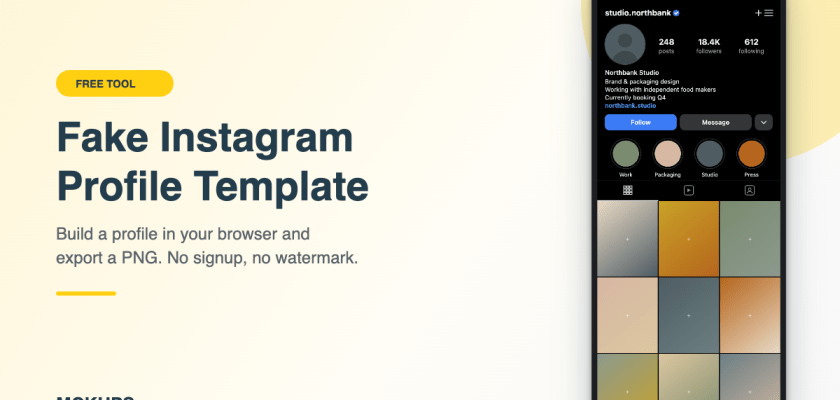
A free, editable fake Instagram profile template you fill in right here in the browser. Avatar, bio, follower counts, nine grid tiles. Export a PNG when it looks right.
Click the avatar or any grid tile to add your own image. Drag a batch of images straight onto the preview to fill the grid.
Export, not preview
A real PNG at up to 3x, not a watermarked teaser you have to pay to unlock.
Your images stay yours
Every file you add is read by your own browser and drawn locally. Nothing reaches a server.
The current grid
Vertical 4:5 thumbnails, the way profiles crop now, not the old squares most templates still show.
How to use the fake Instagram profile generator
Four steps, about two minutes.
If you are building a mock account for a demo and want it to look lived-in, the details that sell it are the bio line and the follower-to-following ratio. A profile with 40k followers and 38k following reads as a bot farm. Nobody consciously checks. Everybody notices.
What you can edit
- Username, display name and the verified tick
- Bio, up to four lines, line breaks respected
- The link line under the bio
- Posts, followers and following counts, as free text so you can write 18.4K or 1,204
- Profile picture
- All nine grid thumbnails in the vertical 4:5 crop
- Highlight circles, zero to five, with your own covers and labels
- Light or dark theme
- Active tab: grid, reels or tagged
- iPhone frame on or off, status bar on or off
Leave everything blank and you get a clean blank Instagram profile template with placeholder colour tiles. That is often all a wireframe or a lecture slide needs. There is a Shuffle colors button if the default palette clashes with your deck.
Prefer a PSD you can open in Photoshop?
The generator exports a flat PNG. If you need layers, lighting control, or a photorealistic device render for a client presentation, a PSD is the better tool.
Rough rule: PNG from this page for decks, docs, props and anything that lives on a screen. PSD when a client is paying for the presentation.
Get the Instagram profile mockup PSDLayered PSD, so you will need Adobe Photoshop to open it and swap the smart objects.
What people use a fake Instagram profile for
Design pitches, mostly. You are proposing a rebrand and the client wants to see the grid as a whole, not nine loose squares in a Figma frame.
Beyond that it comes up in places you would not expect. Film and theatre props, where a character’s phone has to show something on screen. Fiction and book promo campaigns built around a character’s account. UX case studies where you need a realistic profile state without exposing a real person’s data. App demos and onboarding screenshots. Training decks for social media teams. And media-literacy lessons, where a teacher needs an example of what a scam or impersonation account looks like without sending students to a live one.
That last case is why the tool ships with obviously fake defaults and no Instagram logo. It makes the images useful for teaching and useless for actually deceiving anyone.
FAQ
Is it really free?
Yes. No account, no email, no watermark, no export limit.
Do my images get uploaded to your server?
No. Every image you add is read by your own browser and drawn onto a canvas locally. Nothing is sent anywhere, and closing the tab clears it.
Can I use the exported image commercially?
The template and the generated layout, yes. Whatever images you drop into it stay under whatever licence they already carry, so check that separately.
Does it match the current Instagram layout?
It follows the current structure, including the vertical 4:5 grid crop rather than the old squares. It is deliberately not a pixel clone, and it carries no Instagram logo or icons.
Can I get this as an editable PSD instead?
Yes, see the Instagram profile mockup PSD above.
Does it work on a phone?
It works, though the controls are cramped. A laptop is much easier for filling nine grid tiles.
More free tools
This is one of a small set of browser tools we are building alongside the mockup collection.
See all free toolsRelated free mockups
Not affiliated with, endorsed by, sponsored by or connected to Instagram or Meta Platforms, Inc. This tool produces mock images for design, presentation, portfolio, prop and educational use. Do not use it to impersonate a real person or organisation.
